


Apple TV: Shows, Movies & More
4.06.74K Reviews
App Specs
- Version
- Varies with Device
- Updated On
- License
- Free
- Downloads
- 100,000,000+
- Developer
- Apple
- Categories
- Entertainment
- Platform
- Android, iOS
Screenshots





 Analysis by AppCompare
At home, a streaming app has to work for more than one person: someone wants a film, someone else is following a series, and the remote may be in a different room from the phone. I find Apple TV: Shows, Movies & More most useful when the household wants a convenient place to explore Apple’s own entertainment and keep track of what to watch, rather than a magic replacement for every other streaming service. It is a free entertainment app from Apple, but access to some content involves in-app purchases, so “free to download” is not the same as “everything is included.”
What shared viewing looks like in practice
Picture an ordinary evening: one person is choosing a film on the living-room television while another checks what to watch on a phone. A shared viewing hub can make browsing feel less scattered, especially if the household already uses Apple’s services. But I would treat the app as a way to find and resume entertainment, not assume that everyone’s preferences, subscriptions, or viewing history will be neatly separated. Before settling into a family routine, it is worth checking which account is signed in and what content the household can actually play.
That distinction matters because a show can appear in a browsing experience without being included in the cost of downloading the app. Some viewing may depend on a subscription or an individual purchase, and the app lists in-app purchases ranging from $9.49 to $239.99 per item. Those amounts cover a broad range of possible purchases, not a single standard fee, so I would check the price attached to a specific title before pressing play or confirming a transaction.
Guides and Analysis on Apple TV: Shows, Movies & More
Set expectations before handing over the remote
If several people use the same device, I recommend agreeing on a simple rule: check the active account and the title’s playback terms before buying or starting something. That small pause can prevent the familiar household confusion of one person assuming a movie is included while another discovers that it requires a separate payment. It also makes it easier to distinguish content that belongs to a service from content that is simply available to browse.
The app is available at no charge, which makes trying it straightforward, but I would not interpret that as a promise of an entirely free catalogue. Apple’s app is best approached as a front door to entertainment whose costs can vary by title and access arrangement. If you are comparing it with a service where you already know a particular monthly subscription covers the shows you watch, check the actual titles you care about first; convenience is less valuable if the content you want adds unexpected costs.
Coordination matters as much as recommendations
For a household, the practical question is not only “What should we watch?” but also “Can we pick up where we left off, and will the right person be able to find it again?” The Up Next feature described in the app experience can help with continuity by keeping track of viewing progress. I find that most useful when I’m following a few series at once or when a viewing session gets interrupted. It is less of a substitute for household coordination if different people share one viewing setup and want distinct lists or histories.
A useful routine is to use the app’s browsing and continuation tools to narrow down options before everyone sits down, then confirm the selected title’s access and price on the screen where it will be watched. This separates discovery from the final decision. It is a small workflow, but it avoids spending ten minutes choosing a film only to find that the household was looking at a title that needs a separate purchase.
Worth Reading Before You Choose

Baby Panda World Brings Quick Play to Modern Phones, but Its Game Library Feels Busy

ESPN’s Live Game View Makes Following Close Games Easier

QuizzLand Review: A Good Fit for Short Trivia Breaks, Not Every Player

Basketball Stars: Multiplayer Is Fast, but Can It Recover When Matches Go Wrong?

WEBTOON Turns Phone Updates Into a Better Reading Routine

Link to Windows Runs on Shared Habits, Not Social Feeds
Age context and trust
The app has a Teen age rating, a useful signal for deciding whether it belongs on a young person’s device, but it should not be treated as a guarantee that every title is suitable for every teenager or family. I’d still look at the individual show or film and make the call based on the person watching. That is especially sensible when a shared screen makes it easy for someone to browse beyond the kind of content the family usually chooses together.
My general advice is to make content decisions title by title rather than relying on the app’s overall age label. If the app is being used by a younger family member, an adult can help choose what to watch and review any purchase before it is made. I would not assume that a shared household setup automatically creates separate viewing boundaries or spending approval; make those expectations clear among the people using the device.
Who is likely to get the most from it?
I’d recommend trying the app if you want to explore Apple’s entertainment offering, already use Apple devices or services, or like having a familiar place to resume something you started. It can also suit a household that wants to browse together and is comfortable checking whether a title is included, requires a subscription, or costs extra. Apple TV has a 4.2 average rating from around 102,000 ratings, and it has passed 100 million installs, which gives a sense of its reach without telling you whether its catalogue fits your particular taste.
On the other hand, I would not make it my first choice if your main goal is to watch a specific catalogue that you already get elsewhere, or if you want one predictable subscription to cover everything you browse. A service dedicated to the shows and films you follow may be simpler for that use. The better choice depends less on the interface than on the titles you want and how you prefer to pay for them.
As an app, it is free to install, carries a Teen rating, and was released on February 16, 2021. Those details help set the basic context, but my recommendation is still practical: check the content and terms that matter to you, then decide whether this is a useful addition rather than assuming it should replace your existing viewing habits.
Hey everyone! So, I've been diving into the world of Apple TV: Shows, Movies & More lately, and I gotta say, it's been quite the ride. If you're on the hunt for a new streaming app to binge your favorite shows and discover fresh content, this might just be worth checking out. Let me take you through my thoughts on it.
Getting Started with Apple TV
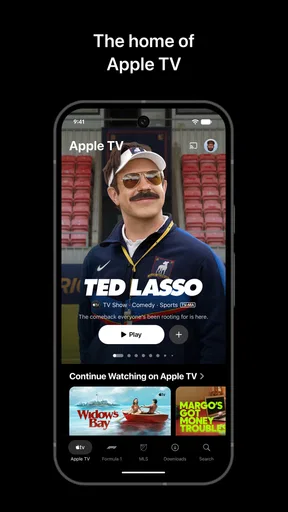
First off, setting up Apple TV is a breeze. You just download the app from the App Store, log in with your Apple ID, and you're good to go. The interface is sleek and user-friendly, which is a big plus. Everything is laid out neatly, making it super easy to navigate even if you're not a tech guru.
The Content Galore
Now, let's talk content because that's what we're all here for, right? Apple TV offers a wide array of options including exclusive Apple Originals, popular TV shows, and a vast library of movies. Whether you're into thrillers, comedies, or documentaries, you'll find something to suit your taste. I found myself pleasantly surprised by the variety and quality of the content available.
One of the standout features is the seamless integration with other streaming services. You can access content from your other subscriptions like HBO and Amazon Prime Video all in one place. This makes it incredibly convenient as you don't have to keep jumping between different apps. Everything's right there at your fingertips.
Personalized Experience
Another aspect that I really appreciated is the personalized recommendations. Apple TV uses your viewing history to suggest shows and movies you might like. It's like having a friend who knows your taste in entertainment. I found myself discovering new shows that I probably wouldn't have watched otherwise.
Moreover, the "Up Next" feature is a lifesaver. It keeps track of where you left off in a show or movie, so you can easily pick up right where you left off. This is especially helpful for someone like me who tends to watch multiple shows at once.
Quality and Performance
As for the streaming quality, it’s top-notch. Whether you're watching on your phone, tablet, or casting to a TV, the video quality is crisp and clear. I didn't experience any buffering issues or lags, which is a huge relief. The app runs smoothly, and the streaming is flawless, providing an immersive viewing experience.
Final Thoughts
All in all, Apple TV: Shows, Movies & More is a solid choice if you're looking for a comprehensive streaming solution. It has a great selection of content, offers personalized experiences, and the performance is stellar. Whether you're an Apple enthusiast or just someone who loves good TV, this app is definitely worth a try.
If you decide to give it a go, you can find it easily on the App Store. Happy watching!
Pros
- User-friendly interface and navigation.
- High-quality streaming with minimal buffering.
- Seamless integration with Apple ecosystem.
- Wide variety of exclusive content available.
- Family Sharing support for multiple users.
Cons
- Limited availability of third-party apps.
- Higher subscription cost compared to some rivals.
- Content library varies by region.
- Offline download option is limited.
- Requires stable internet for optimal performance.
FAQs for Apple TV: Shows, Movies & More
What content is available on Apple TV?
Apple TV offers a diverse range of content, including original shows and movies from Apple TV+, as well as access to popular streaming services like Hulu, Amazon Prime Video, and Disney+. Users can also rent or purchase films and series from the iTunes Store, providing a comprehensive entertainment experience.
Is Apple TV subscription-based?
Apple TV itself is not a subscription service, but Apple TV+—the streaming service within Apple TV—requires a monthly subscription. Some content is available for purchase or rental without a subscription, while others require subscriptions to external services, which can be accessed through the Apple TV app.
Can I download content for offline viewing on Apple TV?
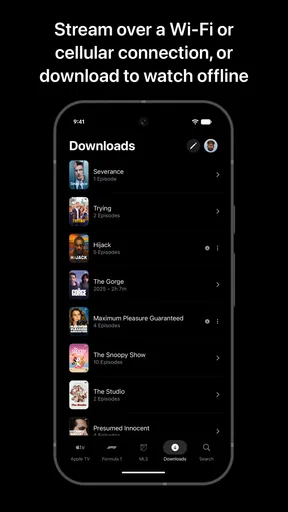
Yes, with Apple TV+, you can download shows and movies for offline viewing on your iOS devices. This feature is particularly useful for users who want to watch content without an internet connection, making it ideal for traveling or areas with limited connectivity.
What devices support the Apple TV app?
The Apple TV app is widely compatible, available on Apple devices such as iPhone, iPad, Mac, and Apple TV hardware. Additionally, it can be accessed on select smart TVs, streaming devices like Roku and Amazon Fire TV, and gaming consoles, allowing for flexibility in viewing options.
How does Apple TV integrate with other Apple services?
Apple TV integrates seamlessly with other Apple services like iCloud and Apple Music, allowing users to sync and access their content across devices. It also supports features like AirPlay for streaming to other Apple devices and Family Sharing, enabling shared access to purchased content.


